How to Start Guest Posting (Step-by-Step Guide)
You want to build backlinks, grow your audience, and establish yourself as an authority. Guest posting makes all of that possible. But how to start guest posting feels like a maze when you have never done it before.
After years of helping website owners get published on real, high-quality sites, I can tell you one thing: The process is easier than most people think. You don’t need a huge email list, perfect grammar, or a famous name. You need a clear system and the right tools.
This guide takes you through every step using plain English and real-world examples. You’ll learn exactly where to find guest post opportunities, how to pitch like a pro, and what to avoid so you never get penalized by Google.
Let’s get started.
What Is Guest Posting (The Right Way)?
Guest posting means writing helpful content for another website. In return, you usually get a short bio and a link to your own site. When done right, it benefits everyone: the host site gets free content, their readers learn something valuable, and you get exposure and a natural backlink.
The wrong way (do not do this):
- Paying for links disguised as articles
- Using the same spun article on dozens of low-quality sites
- Stuffing exact-match anchor text everywhere
- Ignoring the host site’s audience completely
Google’s search engine and spam policies are very clear. Link schemes, misuse of small content, and manipulative guest posting patterns can lead to manual actions. Your goal is to be helpful first. Ranking will happen naturally.
Why You Should Start Guest Posting Today
Before diving into the steps, understand what you actually gain.
Real benefits from real guest posting:
- Targeted traffic – People who read your post already care about your topic. They click your bio link because they want more from you.
- Credibility – When respected sites publish your work, new customers trust you faster.
- Networking – Every editor you work with becomes a professional contact. That leads to podcasts, joint ventures, and paid writing gigs.
- Long-term SEO – Editorial backlinks from relevant sites survive every Google update. They are not tricks. They are endorsements.
GP Publisher has helped hundreds of businesses see these results within three to six months of consistent guest posting. One post changes almost nothing. Twelve posts on six relevant sites start to move the needle for real.
Phase 1: Prepare Yourself Before You Pitch
Most beginners make the same mistake. They write emails before they have anything to show. Don’t do that.
Build Your Author Foundation
Editors want proof that you’re a real person who writes well. Before contacting anyone, make sure you have:
- A complete About page on your own website with your photo
- At least three published samples (your own blog counts)
- An active social media profile (even small accounts prove you exist)
- A professional email address (not a Gmail if possible, but Gmail works fine)
GP Publisher recommends spending two weeks writing five helpful posts for your own blog. They don’t have to be perfect. They just need to be useful. Use them as your templates.
Define Your Target Audience
Ask yourself these three questions and write down the answers:
- Who exactly needs what you offer? (Example: “Freelance graphic designers who struggle with pricing” is better than “everyone”)
- What action do you want readers to take? (Subscribe to your newsletter? Download a free guide?)
- Which page on your site deserves the link? (Your best blog post, not your homepage)
Keep these answers visible while you research guest posting sites.
Phase 2: Where to Find Guest Posting Websites (The Smart Way)
This is where most people get stuck. They search for “write for us” and find hundreds of low-quality sites that will accept anything. It’s a waste of time.
Instead, use a combination of free search operators and a professional marketplace.
Free Search Operators (Works for Anyone)
Use these Google searches with your topic:

"write for us" + your niche"guest post" + your niche"contribute to" + your niche"become a contributor" + your niche
Example for a fitness coach:
"write for us" fitness"guest post" weight loss
This method is effective, but you will manually filter out many irrelevant or spammy results.
A Faster, More Reliable Method: GP Publisher Website Network
GP Publisher maintains an extensive, vetted directory of websites that accept guest posts. At GPPublisher.online, you can access over 29,992 websites in dozens of countries and locations.
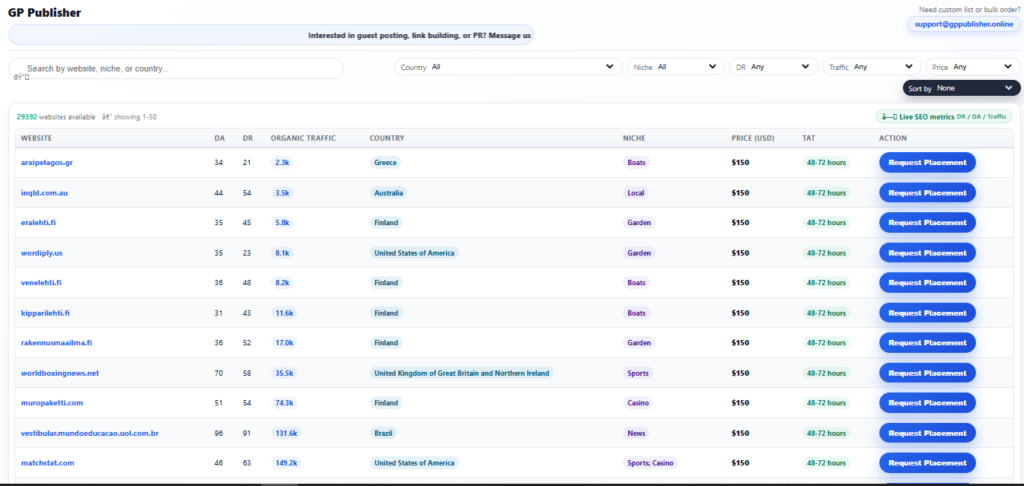
Let me show you how it works, because it’s the tool I wish I had when I started guest posting.
The Filters (Find Your Perfect Match)
Instead of guessing, you use simple dropdown menus:
- Country – Choose All or a specific country (USA, UK, Australia, Brazil, Finland, Greece, and many more)
- Niche – Filter by topic so you only see relevant sites
- DR (Domain Rating) – Pick a range that matches your budget and goals
- Traffic – Filter by monthly organic visitors (from 2k to over 400k)
- Price – Set your budget per post
Then click Sort to organize results by what matters most to you.
What Each Website Listing Shows
GP Publisher displays a clean table with everything you need to make a smart decision:
| Column | What It Tells You |
|---|---|
| Website | The domain name (click to visit) |
| DA / DR | Authority metrics (higher is generally better, but relevance matters more) |
| Organic Traffic | How many monthly visitors the site gets from Google |
| Country | Where the audience is located |
| Niche | What topics the site covers |
| Price (USD) | The cost for a guest post (transparent, no hidden fees) |
| TAT | Turnaround time (how quickly your post gets published) |
| Action | A Request Placement button |
Here is a real example from the GP Publisher network:
essexhotelrooms.co.uk – United Kingdom, Food niche, DR 53, DA 55, 6.4k monthly traffic, $160
You can instantly see if that site fits your audience and budget. No more back and forth emails just to get a price.
How the Request Placement Button Works (Very User-Friendly)
When you find a website you like, you click the Request Placement button. This instantly opens an email draft in your default email client (Gmail, Outlook, etc.).
The draft is already addressed to support@gppublisher.online. It auto-fills with the website details:
text
I am interested in publishing a guest post on the following website:

Website: essexhotelrooms.co.uk
Country: United Kingdom of Great Britain and Northern Ireland
Niche: Food
DR: 53
DA: 55
Traffic: 6.4k
Price: $160

Please share:
- Publishing guidelines
- Turnaround time confirmation
- Payment details
What happens next? You have two options:
- Send as-is – If you already have a ready article, you can reply to the confirmation and attach your draft.
- Request a custom price – Hi, thank you for the offer. Unfortunately, the listed price of $150 is above my current budget. My budget for this site is $80. Could you please check with the publisher if this price can be accepted?
GP Publisher handles communication with website owners. You save hours of negotiation and avoid being ignored.
This system solves the biggest problem that beginners face: knowing who to email and what to say.
Phase 3: Writing Pitches That Get Published (Real Template)
Once you have a target site, you need to pitch it to an editor. Even with GP Publisher handling placement, you still need to suggest a topic.
The Simple Pitch That Works Every Time
Subject line: Guest post idea for [Site Name]
Body:
Hi [Editor name],
I really enjoyed your post about [specific post title]. The section on [specific detail] gave me a new perspective.
I have three topic ideas for your readers:
- [Headline that solves a specific problem]
- [Another headline, different angle]
- [Third headline, practical and actionable]
I am a [your role] who previously wrote for [sample link]. Would you like me to draft the first option?
Best,
[Your name]
What this pitch does right:
- Shows you actually read their site
- Proposes value, not link demands
- Makes it easy for the editor to say yes
GP Publisher has analyzed thousands of successful pitches. Short, specific, and respectful always outperform long, flattering, and vague.
Phase 4: Writing the Guest Post (Follow Google’s Helpful Content Rules)
You got it. Don’t waste it now.
Get the Guidelines First
Every site has different rules. Ask for their style guide before you write a single word. Specifically ask about:
- Heading format (sentence case or title case?)
- Number of links allowed (usually 1–2 per post)
- Link types (do they allow do-follow? most reputable sites do)
- Author bio (what can you include? a link to your site? social handles?)
- Images (do they provide them, or do you need to supply?)
GP Publisher always offers these guidelines when you use their placement service. No guesswork.
Write for Humans First (Google Will Reward You)
Helpful content updates primarily target content written for search engines. Avoid these common mistakes:
Bad (manipulative):
“If you want to learn how to start guest posting, guest posting is the best guest posting strategy for guest posting success.”
Good (helpful):
“Guest posting takes practice. Start with one pitch per day for two weeks. You’ll get an acceptance. It’s a win-win.”
Use examples from your own experience. Tell stories. Break the text into short paragraphs with subheadings. End each section with a practical takeaway.
Where to Place Your Link
Don’t demand a link in the first paragraph. Editors hate it.
Natural placements include:
- Citing a statistic from your own research
- Referencing a previous article you wrote that expands on a subtopic
- Linking to a free tool you created that genuinely helps the reader
GP Publisher recommends one contextual link per 1,000-1,500 words. Anything more seems promotional.
Phase 5: After Your Guest Post Goes Live (The Step Everyone Skips)
Your article has been published. You’ve shared it on social media. Now what?
Promote Without Being Annoying
- Email your list with a short note: “I wrote a guest post about [topic] on [site name]. Check it out here.”
- Reply to every comment on the post (ask follow-up questions, do not just say “thanks”)
- Pin the post to the top of your social profiles for three weeks
Build the Relationship for Future Posts
Send a genuine thank you to the editor. Not a template. Write something specific that you learned from working with them.
Then ask: “I have another idea for your readers. Would you be open to a second post next month?”
The hardest guest post is the first one. The second one is ten times easier because you are not a known quantity.
Track What Actually Matters
Ignore domain authority changes. They don’t affect your business.
Track instead:
- How many clicks came from the guest post (use UTM parameters)
- Whether those visitors signed up for your email list
- Any direct messages or inquiries that mention the post
GP Publisher provides tracking reports when you use their network. You see exactly what works so you can double down.
Common Mistakes That Get Guest Posts Rejected (Or Penalized)
Learn from others so you do not repeat their errors.
| Mistake | Why It Fails |
|---|---|
| Pitching without reading the site | Editors spot this in three seconds |
| Using the same email for 50 sites | Zero personalization = zero replies |
| Demanding do-follow links | Ethical publishers decide link attributes |
| Submitting AI-generated content | Google detects it AND readers hate it |
| Ignoring comments after publication | Shows you only wanted a link |
GP Publisher helps clients avoid all of this by providing clear guidelines and editorial review before submission.
Your Simple Action Plan (Start Today)
Now you have everything you need to start guest posting. Here’s your three-step plan for the next 24 hours:
- Visit GPPublisher.online/GP-Publisher-Website-Network.html – Use the filters to find five websites in your niche. Note their price and traffic.
- Request placement on one site – Click the Request Placement button. The email draft opens automatically. Add your topic idea and send it to support@gppublisher.online.
- Write one pitch for a free site – Use the free search operators to find one blog that accepts guest posts without payment. Send the pitch from Phase 3.
Do these three things today. Don’t wait until you feel ready. You’ll learn more by sending in one incomplete application than by reading ten more guides.
Final Thoughts from GP Publisher
Guest posting isn’t magic. It’s consistent, value-driven publishing on sites that already have your ideal readers. The process is simple: find the right sites, create helpful headlines, write for humans, and build relationships.
GP Publisher is here to make the “find the right sites” part easy. With over 29,992 websites in the network, filters for country, location, DR, traffic, and price, and a one-click request placement system that automatically fills out email drafts to support@gppublisher.online, you save hours of manual research and negotiation.
Whether you use the free methods, the GP Publisher Network, or a combination of both, get started today. One guest post this week leads to two next month. Two leads grow to ten by the end of the quarter. That’s how you build authority that lasts.
Visit GPPublisher.online to see the full website network. Click on the placement request on any site that suits your goals. GP Publisher handles the rest while you focus on writing great content.
Your first guest post is waiting. Go get it.
Previous articles:
[…] How to Start Guest Posting: Step-by-Step Guide for Success High Quality Backlinks: What I Learned After 200+ Failures Dofollow vs Nofollow Backlinks: The 2026 Website Guide ←How to Start Guest Posting: Step-by-Step Guide for Success […]
[…] an easy solution to almost every problem. In this article, I’ll share the ten most common guest posting mistakes I’ve seen over the years. More importantly, I’ll show you how to avoid them. No […]
[…] Guest posting gets a bad name because so many people do it badly. Writing a 500-word article full of links and sending it to 200 random sites? That’s spam. […]